
ABAP REST API (Representational State Transfer). REST-compliant Web-based services
RESP API 사용 URL 포맷
http://<domain:port>/zsicf_service/zhandler_template?sap-client=100¶=...
개요
WWW -> Request -> ICF -> Request Handler : cl_rest_http_handler -> Resource provider : cl_rest_resource -> Response
웹에서 ABAP REST API 를 호출하여 SAP 웹서비스를 제공
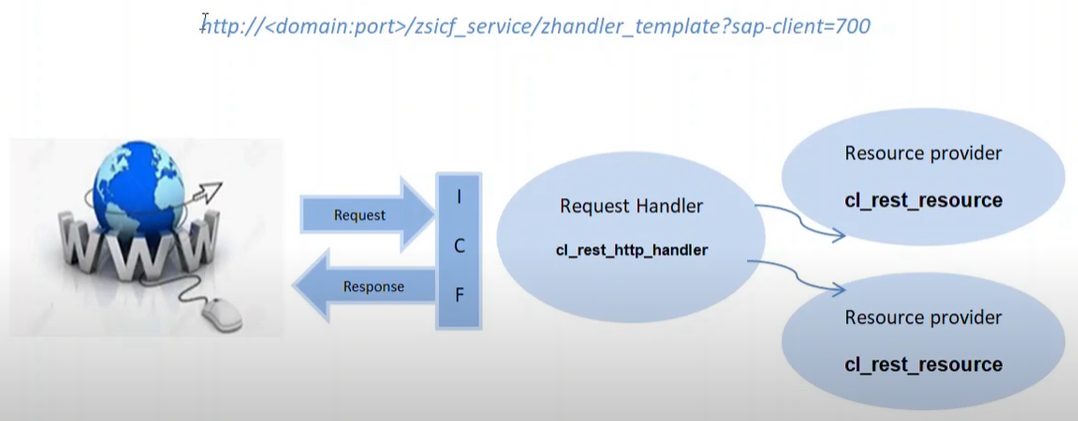
- The HTTP protocol is used for communication
- The REST interface is designed as part of the Internet Communication Framework (ICF) that controls HTTP communication in the AS ABAP (T-code for ICF - SICF)
- Routing of HTTP requests to different services and resources depending on the specified resource paths
- Support of multiple text formats, such as, XML, JSON, plain text, HTML.
Step : REST API in SAP 생성
- cl_rest_resource 를 상속하여 클래스를 생성하고 get, post, put, delete 등의 메소드를 구현한다.
- cl_rest_http_handler를 상속하여 클래스를 생성하고 get_root_handler 메소드와 리소스클래스에 대한 라우터를 구현한다.
- SICF 서비스를 생성하고 생성된 handler 클래스에 추가한다.
- acivate 하고 테스트
샘플예제 시나리오 : 고객불만사항을 web 서비스로 접수하여 저장하고, 상태값을 조회하는 서비스
Development approach
- 테이블 생성
- SNRO로 고객불만사항ID 생성
- resource class 생성후 get/post 메소드 구현
- request handler 클래스 생성
- SICF 서비스 생성 및 active
- postman을 활용한 테스트
ZCL_WEBCOMPLAINT_RH 클래스 생성 (cl_rest_http_handler 상속)

method IF_REST_APPLICATION~GET_ROOT_HANDLER.
data(lo_router) = new cl_rest_router( ).
lo_router->ATTACH(
EXPORTING
iv_template = '/webcomplaint'
iv_handler_class = 'ZCL_WEBCOMPLAINT_RP' ).
RO_ROOT_HANDLER = lo_router.
endmethod.
ZCL_WEBCOMPLAINT_RP 클래스 생성 (cl_rest_resource 상속)

method IF_REST_RESOURCE~GET.
data: lv_string1 type string,
lv_string2 type string,
gs_complaint type ZREST_COMPLAINT.
lv_string1 = mo_request->get_uri_query_parameter( iv_name = 'ID' ).
select single * from zrest_complaint into corresponding fields of gs_complaint where id = lv_string1.
/UI2/CL_JSON=>SERIALIZE(
EXPORTING
DATA = gs_complaint
RECEIVING
R_JSON = lv_string2 ).
mo_response->create_entity( )->set_string_data( iv_data = lv_string2 ).
mo_response->set_header_field(
EXPORTING
iv_name = 'Content-Type'
iv_value = 'application/json' ).
endmethod.
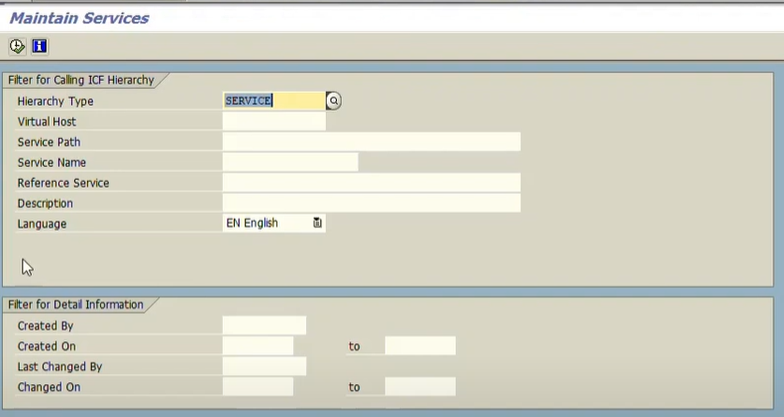
Tcode : SICF 수행
타입 : SERVICE 실행
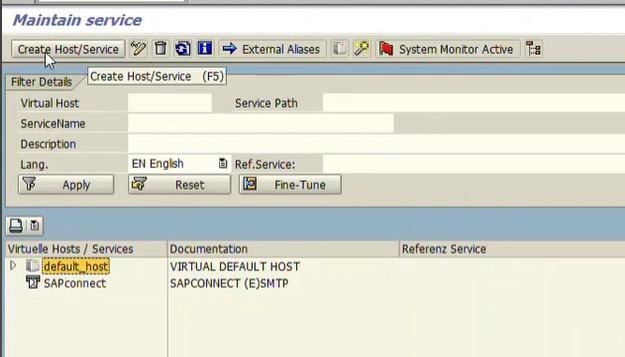
Create Host/Service 생성
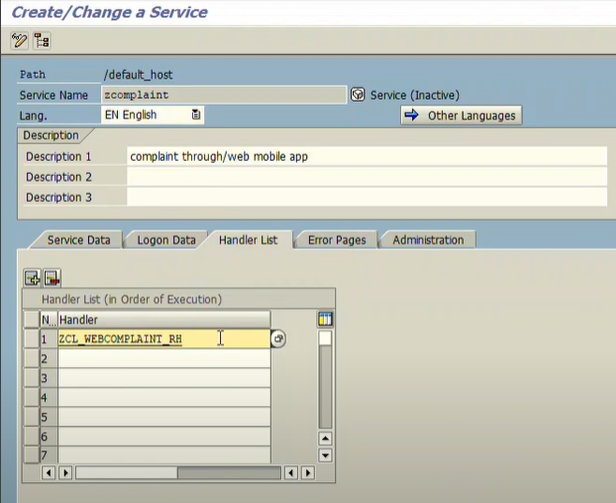
서비스 이름 생성

서비스 path 에 대한 설명과 handler 등록
신규 생성된 서비스 우클릭후 activate service 이후 우클릭 test service

서비스 핸들러에 지정된 path가 아니므로 수행되지 않음
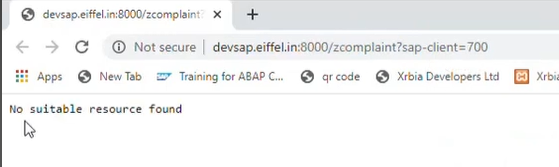
지정된 path 를 추가하면 json 응답이 수행됨

테이블에 저장된 ID 를 parameter로 추가하여 실행하면 데이터가 회신됨

postman을 통한 테스트
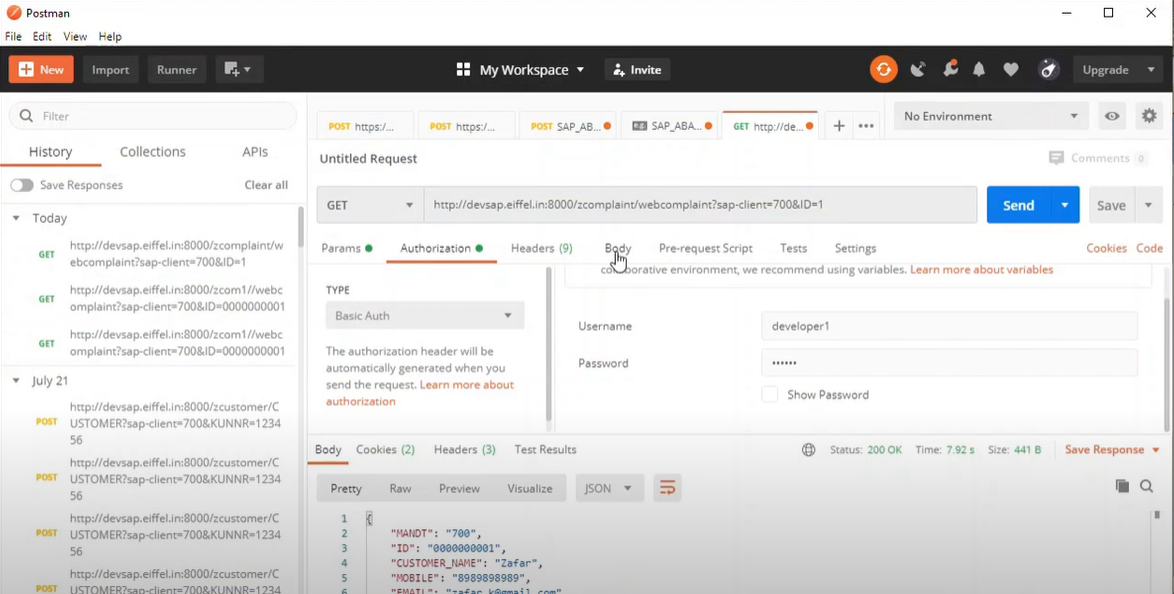
get method 생성 이후 post method 선택 후 생성

method IF_REST_RESOURCE~POST.
data: lv_string1 type string,
lv_string2 type string,
gs_complaint type ZREST_COMPLAINT.
data(lo_entity) = mo_request->GET_ENTITY( ).
data(lo_response) = mo_response->CREATE_ENTITY( ).
"read string data i.e json
data(lv_data) = LO_ENTITY->GET_STRING_DATA( ).
/ui2/cl_json=>DESERIALIZE( EXPORTING JSON = lv_data CHANGING gs_complaint).
CALL FUNCTION 'NUMBER_GET_NEXT'
EXPORTING
NR_RANGE_NR = '01'
OBJECT = 'ZRESTC'
QUANTITY = '1'
IMPORTING
NUMBER = gs_complaint-id.
gs_complaint-createdby = sy-uname.
gs_complaint-createdon = sy-datum.
gs_complaint-time = sy-uzeit.
insert into zrest_complaint values gs_complaint.
/ui2/cl_json=>serialize( EXPORTING data = gs_complaint RECEIVING r_json = lv_response ).
lo_response->SET_STRING_DATA( iv_data = lv_response ).
endmethod.
postman 에서 테스트
처음 설정한 URL에서 GET으로 Header에 key : x-csrf-token / value : fetch 로 토큰값을 가져온다

POST 방식으로 변경한 뒤 key : x-csrf-token / value : 45TZXnvTH... (위에서 생성한 토큰값) 을 입력하고 body에 json 을 넣는다. 타입은 raw
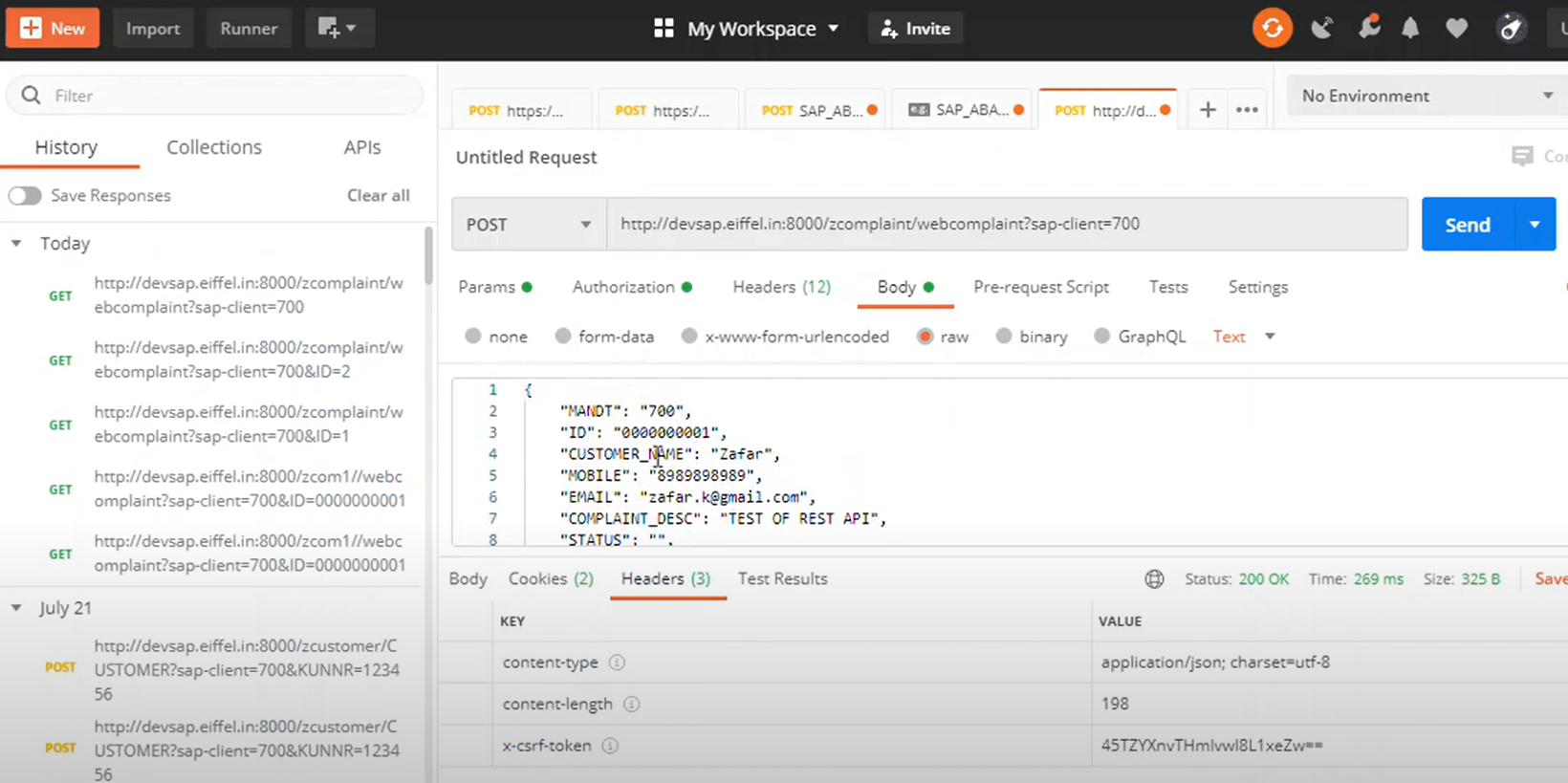
하단 response 를 save file 로 하여 response 값을 파일 다운로드해서 확인할 수 있다.
SE11 에서 데이터가 저장된 것도 확인 가능

참고 : https://www.youtube.com/watch?v=DIFFPPyg40w&t=1994s
'SW > ABAP' 카테고리의 다른 글
| YSOURCEDOWN (0) | 2024.03.28 |
|---|---|
| YFILESHARING (0) | 2024.03.27 |
| SAP HANA Studio 설치, ADT 설치(ABAP Development tools) 설치 (0) | 2023.06.23 |
| ABAP OOP method 호출방법 (0) | 2017.08.08 |
| picture 조회 안되는 현상 조치 (0) | 2017.06.05 |